Home / Article
What naming conventions keep evidence findable?
It's assessment day. Your assessor asks for the March access review, and nobody can find the file.
You have the file. You just cannot find it under a name like review_final2_updated.pdf. This happens in small shops all the time. A clear naming scheme fixes it before it costs you.
Why filenames are evidence, not decoration
CMMC is the Cybersecurity Maturity Model Certification. Level 2 assessments follow the Department of Defense Assessment Guide. The guide says examined documents must be in their final forms. Drafts are not eligible as evidence. A filename like policy_DRAFT.docx tells the assessor the document is not final. A filename like policy_APPROVED_2026-09-15.pdf answers the question before it is asked. (CMMC Assessment Guide Level 2)
Rule 32 CFR Part 170 adds a sharper reason. The Organization Seeking Certification, called the OSC, must hash each artifact file with a NIST-approved hashing algorithm. NIST is the National Institute of Standards and Technology. The OSC hands the assessment team a list of artifact names, the hash values, and the algorithm used. The list is uploaded to the CMMC eMASS system, the DoD assessment tracking tool. The artifacts stay with you, but their names go to DoD. If two files share the same vague name, that list is unreadable. (32 CFR Part 170)
The guide also names the assessment methods: Examine, Interview, Test. Examine means reviewing documents and records. Assessors find your files by name. (NIST SP 800-171A)
The scheme
Name every file with five parts, in this order:
- The CMMC domain or practice number, like
3.1.1. - A short plain-English description, like
access-review. - A version marker, like
v1or the approval date. - The date, always
YYYY-MM-DD. - The file extension.
Join parts with single underscores or hyphens. Never use spaces. Spaces break scripts and shared links.
Examples you can copy:
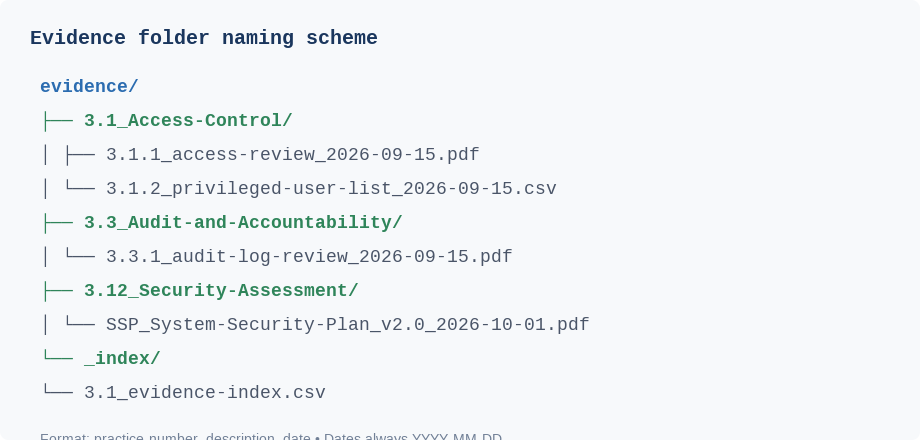
3.1.1_access-review_2026-09-15.pdf3.1.2_privileged-user-list_2026-09-15.csv3.3.1_audit-log-review_2026-09-15.pdfSSP_System-Security-Plan_v2.0_2026-10-01.pdf
SSP is the System Security Plan. It describes how you meet each requirement. Name it by version and date, because assessors compare it against your evidence.
Folder layout to match
Put files in folders named for the CMMC practice family:
evidence/3.1_Access-Control/evidence/3.3_Audit-and-Accountability/evidence/3.12_Security-Assessment/
Keep one index file per family, like 3.1_evidence-index.csv. The index lists each file, the practice it supports, and its hash. This index is what you hand the assessor first.
Four rules that keep it working
Date every file. A file without a date is a file without a story. Assessors ask when evidence was produced.
Never write "final" in a filename unless it is approved. When a new version replaces it, the old one keeps its date. Do not delete it. The six-year retention rule in 32 CFR Part 170 means old evidence still matters. (32 CFR Part 170)
Keep one owner for each folder. The owner approves additions. Evidence without an owner rots.
Handle CUI labels the same way every time. CUI is Controlled Unclassified Information. If a file handles CUI, mark the folder, not each filename. Marking every filename spreads the label everywhere.
Sources
- CMMC Assessment Guide, Level 2, version 2.0, DoD CIO: documents must be in final form; assessment methods Examine, Interview, Test. https://dodcio.defense.gov/portals/0/documents/cmmc/ag_level2_masterv2.0_final_202112016_508.pdf
- 32 CFR Part 170, via govinfo: the OSC hashes artifact files with a NIST-approved algorithm. It provides artifact names, hash values, and the algorithm used. Six-year retention applies. https://www.govinfo.gov/content/pkg/CFR-2025-title32-vol1/pdf/CFR-2025-title32-vol1-part170.pdf
- NIST SP 800-171A, Assessing Security Requirements for Controlled Unclassified Information: assessment methods and objects for each requirement. https://nvlpubs.nist.gov/nistpubs/SpecialPublications/NIST.SP.800-171a.pdf?7ef40c12_page=2&8a5b45c9_page=5
- Original folder tree diagram by PolicyCortex.
Next step
Want evidence that collects itself from your live Azure setup? See how PolicyCortex builds it.